



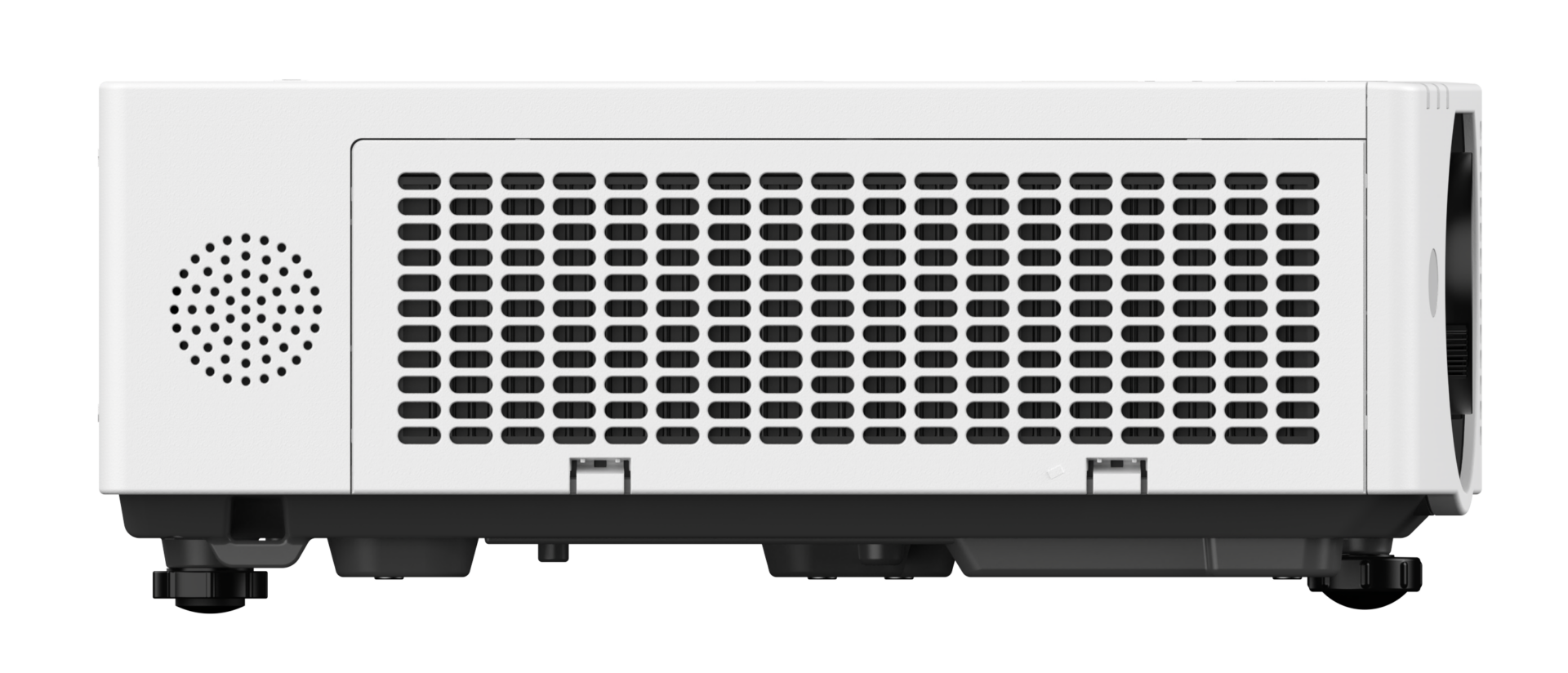
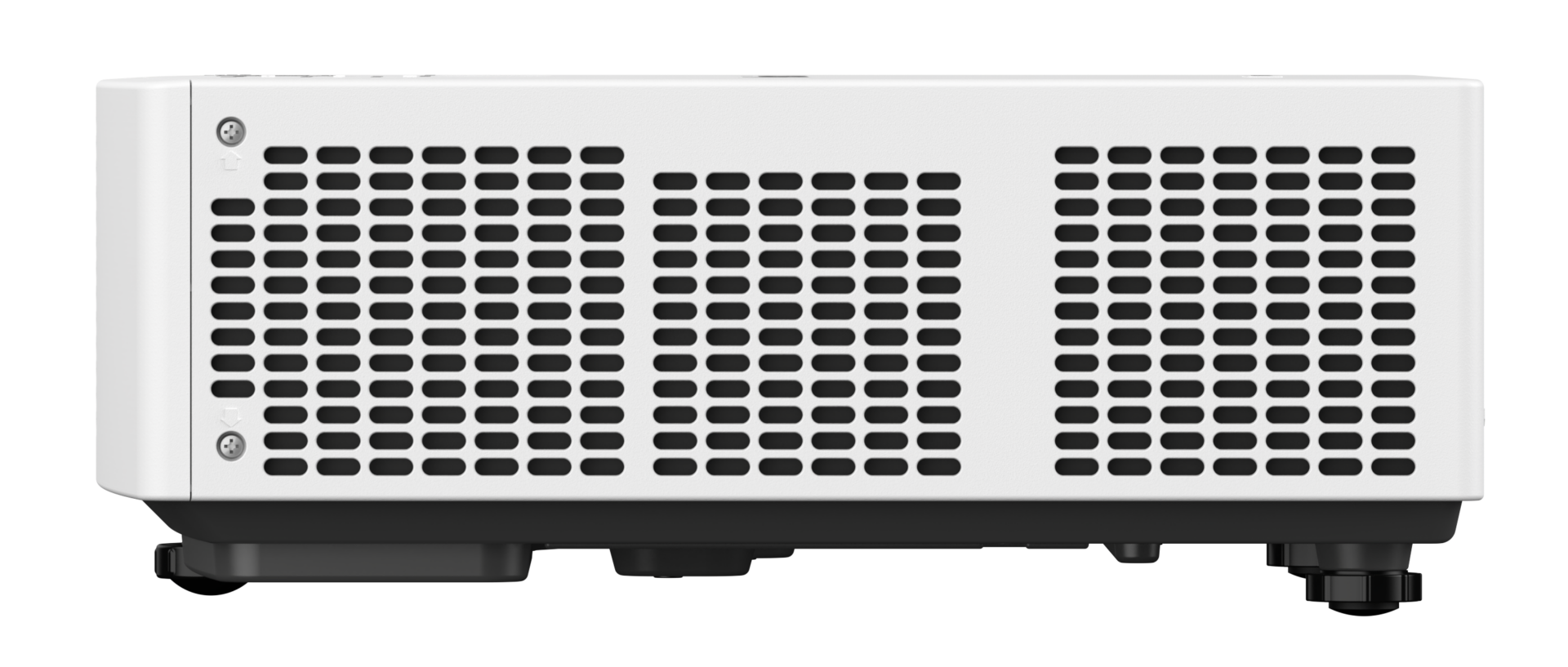
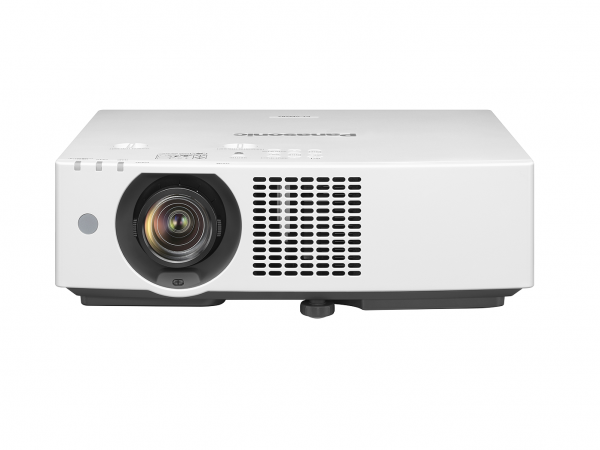
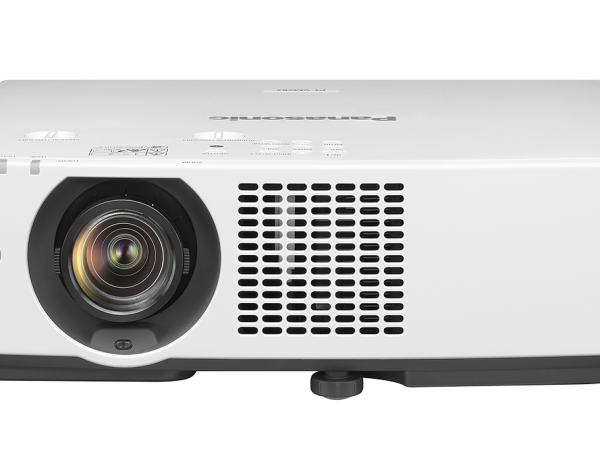


Panasonic PT-VMZ72 WUXGA 3LCD Laser Projector (7,300 lumens)
329,000.00 ฿ 219,000.00 ฿
โปรเจคเตอร์เลเซอร์ WUXGA 7,300 lumens สำหรับห้องประชุมใหญ่ ห้องเรียน ห้องสัมมนา และงานติดตั้งมืออาชีพ
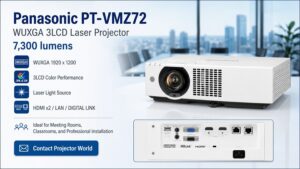
Panasonic PT-VMZ72 คือโปรเจคเตอร์เลเซอร์ 3LCD ความสว่างสูง 7,300 lumens ความละเอียด WUXGA 1920 × 1200 ออกแบบมาสำหรับองค์กรที่ต้องการภาพขนาดใหญ่ คมชัด สว่าง และใช้งานได้จริงในห้องที่เปิดไฟ เช่น ห้องประชุม ห้องเรียน ห้องอบรม ห้องสัมมนา โรงแรม มหาวิทยาลัย หน่วยงานราชการ และโครงการติดตั้งระบบภาพระดับมืออาชีพ
- ความสว่างสูงถึง 7,300 ANSI Lumens มั่นใจได้ในทุกสภาพแสง
- ความละเอียดสูงระดับ WUXGA (1920 x 1200) คมชัดเหนือ Full HD
- ค่า Contrast : 5,000,000:1
- ขนาดภาพ: 30 – 300 นิ้ว
- ขนาดเครื่อง 399 mm x 115 mm x 348 mm
- การรับประกันตัวเครื่อง 3 ปี หลอดภาพ 3 ปีหรือ 20,000 ชม.



PT-VMZ72 เลเซอร์โปรเจคเตอร์ 7,300 ลูเมน ภาพสว่างคมชัด สำหรับองค์กรและห้องประชุมใหญ่
จุดเด่นหลักของ Panasonic PT-VMZ72
1. ความสว่าง 7,300 lumens เหมาะกับห้องที่เปิดไฟใช้งานจริง
Panasonic PT-VMZ72 ให้ความสว่างสูงถึง 7,300 lumens จึงเหมาะกับห้องประชุมหรือห้องเรียนที่ไม่สามารถปิดไฟได้ทั้งหมด เช่น ห้องที่มีไฟเพดาน หน้าต่าง หรือแสงรบกวนจากภายนอก
สำหรับงานนำเสนอจริง ลูกค้าส่วนใหญ่ไม่ได้ใช้งานในห้องมืดสนิท ดังนั้นความสว่างระดับนี้ช่วยให้ภาพ PowerPoint, Excel, Dashboard, PDF, Video และเอกสารประกอบการประชุมดูชัด อ่านง่าย และไม่ซีดจางง่าย
2. ความละเอียด WUXGA 1920 × 1200 คมชัด เหมาะกับงานเอกสารและ Presentation
ความละเอียด WUXGA 1920 × 1200 มีสัดส่วนภาพ 16:10 ซึ่งเหมาะกับการใช้งานในองค์กร เพราะให้พื้นที่แนวตั้งมากกว่า Full HD 16:9 เล็กน้อย ทำให้แสดงเอกสาร ตาราง กราฟ และ Presentation ได้เต็มตามากขึ้น
ถ้าใช้งานกับ Notebook, Microsoft PowerPoint, Excel, Dashboard, ระบบประชุม หรือเอกสารรายละเอียดเยอะ รุ่นนี้ให้ความคมชัดที่เหมาะกับงานจริงมากกว่าโปรเจคเตอร์ XGA หรือ WXGA ทั่วไปอย่างชัดเจน
3. ระบบ 3LCD ให้สีสว่าง สมดุล เหมาะกับงานองค์กร
Panasonic PT-VMZ72 ใช้เทคโนโลยี 3LCD ซึ่งให้ภาพสีสว่างและเป็นธรรมชาติ เหมาะกับงานนำเสนอที่ต้องการสีตรง เช่น ภาพสินค้า ภาพกราฟิก Presentation วิดีโออบรม สื่อการเรียนการสอน และภาพในห้องประชุม
ข้อดีของระบบ 3LCD คือภาพสีไม่ดูหม่นง่าย เหมาะกับการใช้งานในห้องที่เปิดไฟ และช่วยให้ผู้เข้าประชุมมองภาพได้สบายตา
4. Laser Light Source ใช้งานต่อเนื่อง ดูแลรักษาง่าย
PT-VMZ72 ใช้แหล่งกำเนิดแสงแบบ Laser จึงเหมาะกับองค์กรที่ใช้งานทุกวัน เช่น โรงเรียน มหาวิทยาลัย ห้องประชุมกลาง ห้องอบรม และห้องสัมมนา
เมื่อเทียบกับโปรเจคเตอร์แบบหลอดภาพเดิม ระบบเลเซอร์ช่วยลดภาระเรื่องการเปลี่ยนหลอด ลด Downtime และช่วยให้องค์กรควบคุมต้นทุนการดูแลรักษาในระยะยาวได้ดีขึ้น
5. เหมาะกับงานติดตั้งถาวรและระบบห้องประชุมมืออาชีพ
Panasonic PT-VMZ72 ไม่ได้เหมาะเฉพาะการวางตั้งโต๊ะชั่วคราว แต่เหมาะกับงานติดตั้งจริง เช่น ติดเพดาน เดินสาย HDMI, LAN, DIGITAL LINK, เชื่อมต่อระบบเสียง ระบบควบคุม และระบบห้องประชุม
รุ่นนี้จึงเหมาะกับลูกค้าองค์กรที่ต้องการภาพลักษณ์มืออาชีพ ใช้งานง่าย และมีระบบที่รองรับการใช้งานระยะยาว
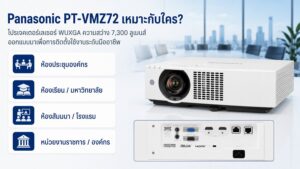
Panasonic PT-VMZ72 เหมาะกับใคร?
ห้องประชุมองค์กร
เหมาะสำหรับห้องประชุมขนาดกลางถึงใหญ่ที่ต้องการภาพสว่าง คมชัด และแสดงรายละเอียดเอกสารได้ดี เช่น PowerPoint, Excel, Dashboard, PDF และ Video Conference
ห้องเรียน มหาวิทยาลัย และห้องบรรยาย
เหมาะกับห้องเรียนหรือห้องบรรยายที่มีผู้เรียนจำนวนมาก ต้องเปิดไฟระหว่างเรียน และต้องการให้ผู้เรียนมองเห็นตัวอักษรหรือภาพประกอบได้ชัดเจนจากระยะไกล
ห้องสัมมนา โรงแรม และห้องจัดเลี้ยง
เหมาะกับห้องสัมมนา ห้องประชุมโรงแรม ห้องจัดเลี้ยง หรือพื้นที่อเนกประสงค์ที่ต้องการฉายภาพขนาดใหญ่ ใช้งานได้หลายรูปแบบ และต้องการความน่าเชื่อถือสูง
หน่วยงานราชการและงานโครงการ
เหมาะกับโครงการติดตั้งที่ต้องการสเปกชัดเจน แบรนด์น่าเชื่อถือ มีการรับประกัน และมีทีมงานให้คำปรึกษาเรื่องการติดตั้งจริง
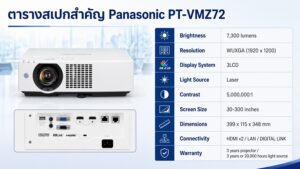
ตารางสเปกสำคัญ Panasonic PT-VMZ72
| รายการ | รายละเอียด |
|---|---|
| รุ่น | Panasonic PT-VMZ72 |
| ประเภท | WUXGA 3LCD Laser Projector |
| ความสว่าง | 7,300 lumens |
| ความละเอียด | WUXGA 1920 × 1200 |
| ระบบภาพ | 3LCD |
| แหล่งกำเนิดแสง | Laser |
| Contrast | 5,000,000:1 |
| ขนาดภาพ | 30–300 นิ้ว |
| ขนาดเครื่อง | 399 × 115 × 348 mm |
| การเชื่อมต่อหลัก | HDMI x2 / LAN / DIGITAL LINK / USB Power |
| เหมาะสำหรับ | ห้องประชุม ห้องเรียน ห้องสัมมนา งานติดตั้งองค์กร |
| การรับประกัน | ตัวเครื่อง 3 ปี / แหล่งกำเนิดแสง 3 ปีหรือ 20,000 ชั่วโมง |
ทำไมควรซื้อ Panasonic PT-VMZ72 กับ Projector World
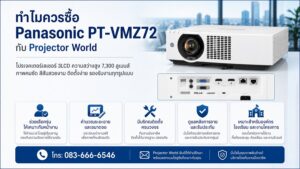
การเลือกโปรเจคเตอร์สำหรับองค์กรไม่ควรดูแค่ “ความสว่าง” หรือ “ราคา” เท่านั้น เพราะถ้าเลือกรุ่นผิด อาจเกิดปัญหาภาพไม่เต็มจอ ภาพไม่ชัด สว่างไม่พอ ระยะฉายไม่พอดี หรือติดตั้งแล้วใช้งานไม่สะดวก
Projector World Co., Ltd. ให้บริการด้านโปรเจคเตอร์ จอรับภาพ ระบบห้องประชุม และงานติดตั้งครบวงจร ช่วยให้ลูกค้าเลือกอุปกรณ์ได้เหมาะกับหน้างานจริง
- ช่วยเลือกรุ่นโปรเจคเตอร์ให้เหมาะกับขนาดห้อง
- คำนวณระยะฉายและขนาดจอ
- แนะนำจอรับภาพที่เหมาะสมกับความสว่างและลักษณะห้อง
- วางระบบเชื่อมต่อ HDMI, LAN, DIGITAL LINK และระบบเสียง
- บริการติดตั้งโดยทีมงานมืออาชีพ
- ดูแลหลังการขายและให้คำแนะนำการใช้งาน
การซื้อโปรเจคเตอร์กับผู้เชี่ยวชาญจึงช่วยลดความเสี่ยงในการซื้อผิดรุ่น และช่วยให้ระบบภาพใช้งานได้ดีตั้งแต่วันแรก
ควรเลือก Panasonic PT-VMZ72 เมื่อไหร่?
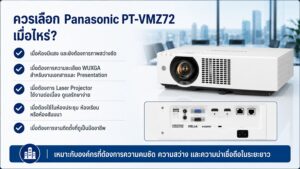
ควรเลือก Panasonic PT-VMZ72 ถ้าคุณมีเงื่อนไขเหล่านี้:
- ห้องมีแสง และยังต้องการภาพสว่างชัด
- ต้องการความละเอียด WUXGA สำหรับงานเอกสารและ Presentation
- ต้องการโปรเจคเตอร์ Laser ที่ใช้งานต่อเนื่องและดูแลรักษาง่าย
- ต้องใช้ในห้องประชุม ห้องเรียน ห้องอบรม หรือห้องสัมมนา
- ต้องการติดตั้งถาวรให้ดูเรียบร้อยและเป็นมืออาชีพ
- ต้องการความน่าเชื่อถือสูงสำหรับองค์กร โรงเรียน มหาวิทยาลัย หรือหน่วยงานราชการ
- ต้องการภาพขนาดใหญ่กว่าจอ TV หรือ Interactive Display ในงบที่เหมาะสมกว่าเมื่อเทียบกับขนาดภาพ
PT-VMZ72 ต่างจาก PT-VMZ62 อย่างไร?
Panasonic PT-VMZ72 และ PT-VMZ62 อยู่ในกลุ่มโปรเจคเตอร์เลเซอร์ WUXGA 3LCD เหมือนกัน แต่จุดต่างสำคัญคือ ความสว่าง
- PT-VMZ62: 6,500 lumens
- PT-VMZ72: 7,300 lumens
ถ้าห้องมีแสงมากกว่า ขนาดจอใหญ่กว่า หรือผู้ใช้งานต้องการเผื่อความสว่างสำหรับงานประชุมและสัมมนา PT-VMZ72 จะเหมาะกว่า เพราะให้ความสว่างสูงขึ้น ช่วยให้ภาพดูชัดขึ้นในสภาพแสงจริง
ก่อนซื้อ Panasonic PT-VMZ72 ควรเตรียมข้อมูลอะไรบ้าง?
เพื่อให้เลือกโปรเจคเตอร์ได้แม่นยำ ควรแจ้งข้อมูลต่อไปนี้ก่อนสั่งซื้อหรือติดตั้ง:
- ขนาดห้อง กว้าง × ยาว × สูง
- ขนาดจอที่ต้องการ เช่น 120 นิ้ว, 150 นิ้ว, 200 นิ้ว หรือ 300 นิ้ว
- ระยะจากตำแหน่งติดตั้งเครื่องถึงจอ
- ลักษณะการใช้งาน เช่น ห้องประชุม ห้องเรียน ห้องสัมมนา หรือห้องอบรม
- ห้องเปิดไฟหรือปิดไฟระหว่างใช้งาน
- ใช้งานกับ Notebook, PC, Video Conference หรือระบบควบคุมห้องประชุม
- ต้องการติดเพดาน ตั้งโต๊ะ หรือแขวนกับโครงสร้างเดิม
- มีระบบเสียงหรือระบบ AV เดิมอยู่แล้วหรือไม่
ข้อมูลเหล่านี้ช่วยให้ทีมงานประเมินได้ว่ารุ่น PT-VMZ72 เหมาะสมหรือควรเลือกรุ่นอื่นที่ความสว่างสูงกว่า/ต่ำกว่า
คำถามที่พบบ่อยเกี่ยวกับ Panasonic PT-VMZ72
Panasonic PT-VMZ72 เหมาะกับห้องประชุมขนาดไหน?
เหมาะกับห้องประชุมขนาดกลางถึงใหญ่ โดยเฉพาะห้องที่เปิดไฟใช้งานจริง และต้องการภาพขนาดใหญ่ คมชัด อ่านตัวอักษรได้ง่ายจากระยะไกล
Panasonic PT-VMZ72 ใช้กับจอ 150 นิ้ว หรือ 200 นิ้ว ได้ไหม?
โดยหลักการสามารถใช้งานกับจอขนาดใหญ่ได้ แต่ควรคำนวณระยะฉายและตรวจสอบระดับแสงในห้องก่อน เพื่อให้ได้ขนาดภาพและความสว่างที่เหมาะสม
PT-VMZ72 เป็นโปรเจคเตอร์ Laser หรือ Lamp?
Panasonic PT-VMZ72 เป็นโปรเจคเตอร์แบบ Laser จึงเหมาะกับการใช้งานต่อเนื่องและช่วยลดภาระการเปลี่ยนหลอดภาพเมื่อเทียบกับโปรเจคเตอร์ Lamp รุ่นเก่า
ความละเอียด WUXGA ดีกว่า Full HD หรือไม่?
WUXGA มีความละเอียด 1920 × 1200 ซึ่งมีพื้นที่แนวตั้งมากกว่า Full HD 1920 × 1080 เหมาะกับงานเอกสาร ตาราง Presentation และการใช้งานกับคอมพิวเตอร์ในองค์กร
PT-VMZ72 เหมาะกับโรงเรียนหรือมหาวิทยาลัยไหม?
เหมาะ เพราะมีความสว่างสูง ความละเอียดดี และเป็นระบบ Laser เหมาะกับการใช้งานในห้องเรียน ห้องบรรยาย และห้องอบรมที่ต้องเปิดใช้งานต่อเนื่อง
ซื้อ Panasonic PT-VMZ72 กับ Projector World ดีอย่างไร?
Projector World ช่วยดูทั้งรุ่นโปรเจคเตอร์ ขนาดจอ ระยะฉาย รูปแบบติดตั้ง ระบบเชื่อมต่อ และบริการหลังการขาย ทำให้ลูกค้าองค์กรลดความเสี่ยงจากการซื้อผิดรุ่นหรือติดตั้งไม่เหมาะกับหน้างาน
อัปเกรดห้องประชุมของคุณสู่ความเป็นมืออาชีพระดับองค์กร
Panasonic PT-VMZ72 WUXGA 3LCD Laser Projector (7,300 lumens) เป็นโปรเจคเตอร์เลเซอร์ที่เหมาะกับองค์กรที่ต้องการภาพสว่าง คมชัด ใช้งานจริงในห้องเปิดไฟ และรองรับงานติดตั้งระดับมืออาชีพ
ถ้าคุณกำลังมองหาโปรเจคเตอร์สำหรับห้องประชุม ห้องเรียน ห้องอบรม ห้องสัมมนา หรือโครงการติดตั้งที่ต้องการความน่าเชื่อถือระยะยาว PT-VMZ72 เป็นรุ่นที่ควรพิจารณาอย่างจริงจัง
- สั่งซื้อ Panasonic PT-VMZ72 ของแท้ ศูนย์ไทย รับประกันเครื่อง 3 ปี
- บริการติดตั้งครบวงจรทั่วประเทศ โดยทีมงานมืออาชีพ ProjectorWorld
- โทร: 083-666-6546 หรือ [แอดไลน์เพื่อขอใบเสนอราคา] @Line ขอใบเสนอราคา
PANASONIC PT-VMZ72 (Laser / 7,300 lm / WUXGA)
Small Size, Huge Impact.
Compact Brilliance Unleashed.
แนะนำโปรเจคเตอร์ซีรีส์ VMZ82: โปรเจคเตอร์ที่ เล็กที่สุดและเบาที่สุดในโลก ในระดับของมัน¹ ให้ความสว่างสูงสุดถึง 8,000 ลูเมน² มอบภาพคมชัดสดใสแม้ในห้องที่มีแสงสว่างจ้า โปรเจคเตอร์ LCD ที่ใช้งานง่ายนี้ติดตั้งได้ง่ายในทุกสภาพแวดล้อม พร้อมฟีเจอร์เฉพาะของ Panasonic เพื่อความสะดวกในการติดตั้ง ตัวเครื่องดีไซน์ทันสมัย ผลิตจากพลาสตูรีไซเคิล และออกแบบเพื่อการใช้งานที่ประหยัดพลังงานและไม่ต้องดูแลบ่อย เหมาะสำหรับสำนักงาน ห้องเรียน และพื้นที่ใช้งานอื่น ๆ
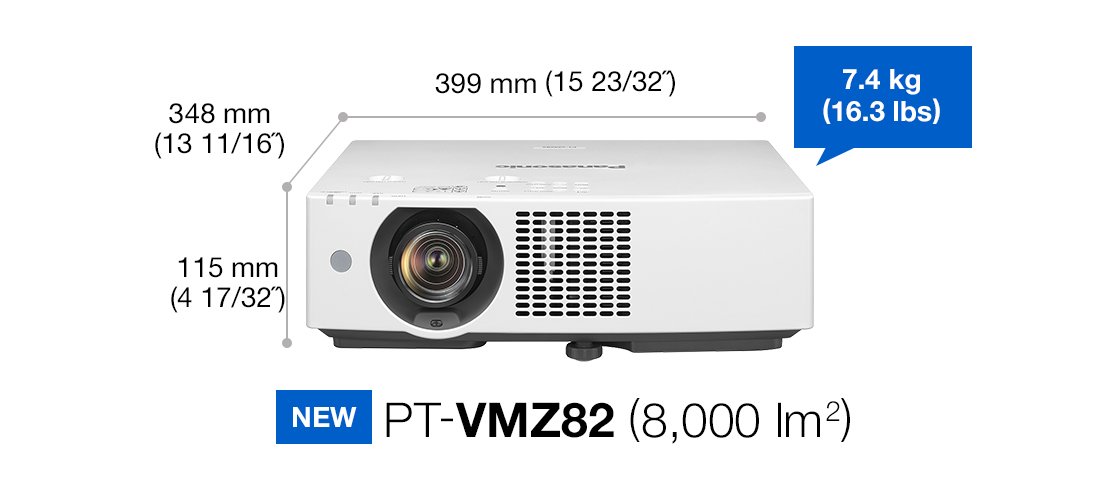
¹ ในกลุ่มโปรเจคเตอร์ที่มีความสว่าง 8,000 ลูเมนขึ้นไป (รุ่น PT-VMZ82), 7,300 ลูเมนขึ้นไป (PT-VMZ72), และ 6,500 ลูเมนขึ้นไป (PT-VMZ62) ณ มีนาคม 2025 ตามข้อมูลวิจัยของ Panasonic
² วัดเมื่อตั้ง [PICTURE MODE] เป็น [DYNAMIC] และ [LIGHT POWER] เป็น [NORMAL] ตามมาตรฐาน ISO/IEC 21118:2020
Clear Projection Tailored to Your Space
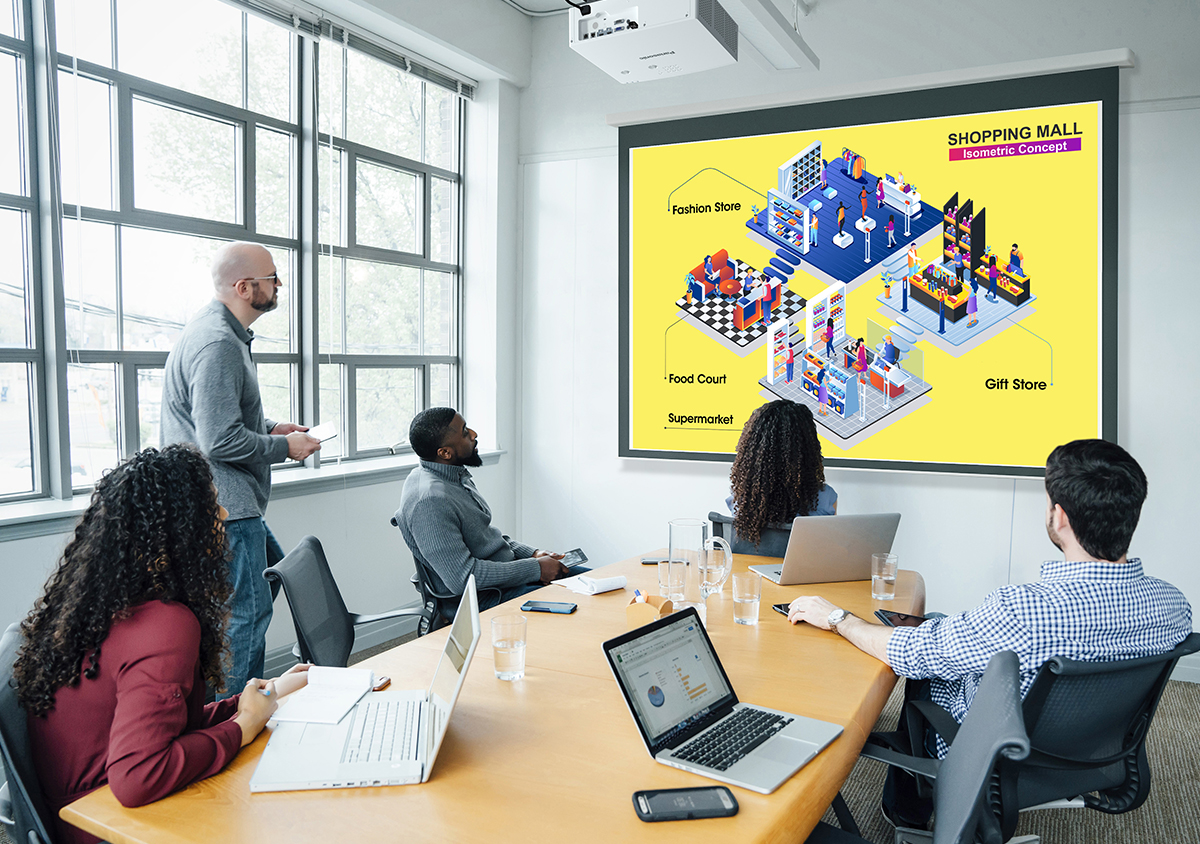
Up to 8,000 lm1 for Stunning Visuals Under Lights
The VMZ82 Series’ high-efficiency optical engine delivers up to 8,000 lm1 brightness, ensuring clear, sharp, and vibrant visuals in well-lit spaces. Enhance viewer comfort and communication quality in meetings and classes without dimming the lights or pulling the blinds.
1 PT-VMZ82 only. Measured when [PICTURE MODE] is set to [DYNAMIC] and [LIGHT POWER] is set to [NORMAL]. Measurement, measuring conditions, and notation method comply with ISO/IEC 21118: 2020 international standards. Value is the average of all products when shipped.
ภาพชัดเจน เหมาะกับพื้นที่ของคุณ
- ความสว่างสูงถึง 8,000 ลูเมน¹: ให้ภาพสว่างชัดสดใสแม้ในที่มีแสง
- คอนทราสต์สูงถึง 5,000,000:1: ให้รายละเอียดภาพในเงามืดและแสงจ้าได้ดี
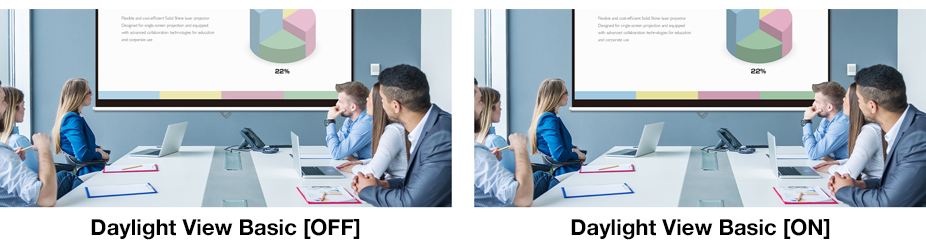
- Daylight View Basic: ปรับแสง สี และความคมชัดอัตโนมัติตามสภาพแวดล้อม
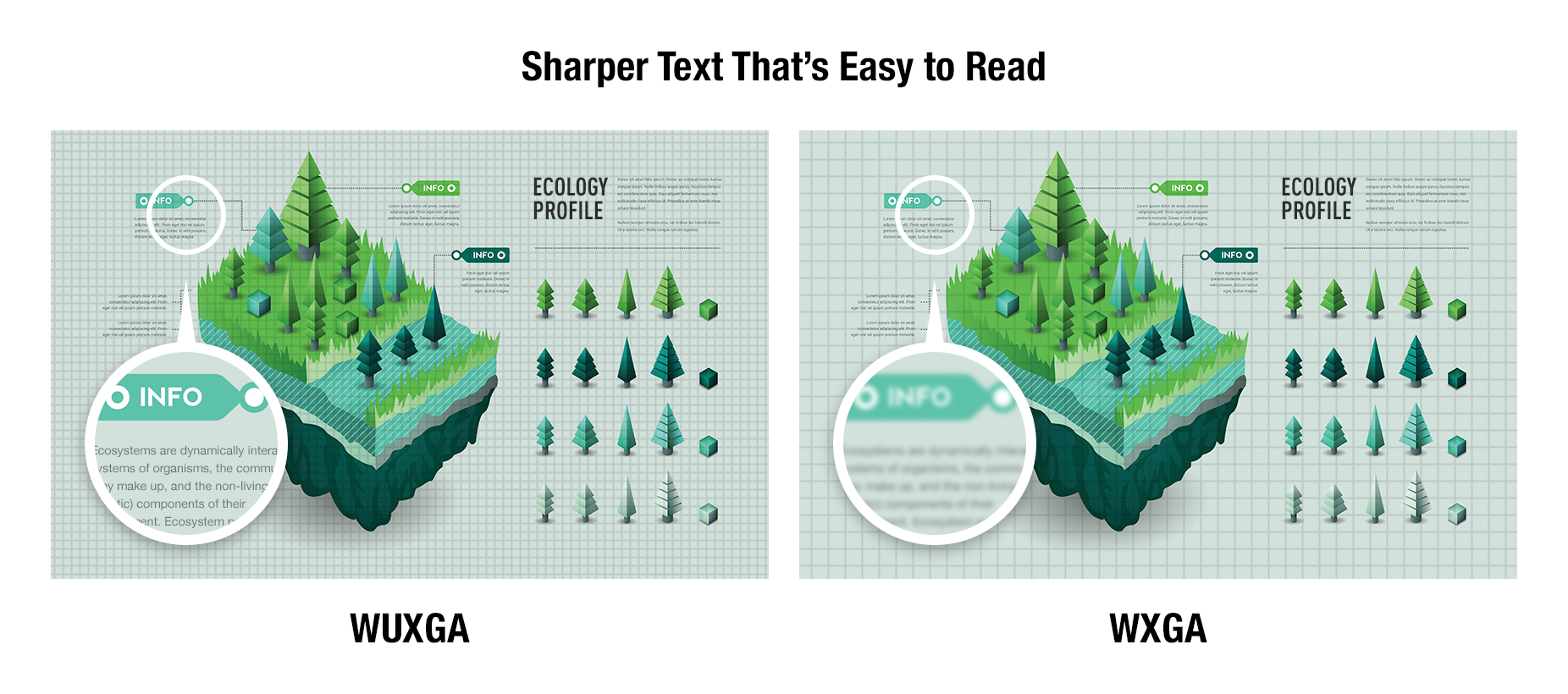
- ความละเอียด WUXGA (1920 x 1200): ให้ตัวอักษรคมชัด อ่านง่าย
- โหมด Vivid Green: ภาพสีเขียวสมจริง เหมาะสำหรับการจำลองกีฬา
High 5,000,000:11 Dynamic Contrast
Input signals are analyzed frame by frame to regulate light output for best contrast performance in every scene. As well as accurately reproducing pictures that contain a mix of dark and bright hues, Dynamic Contrast is more energy efficient than other technologies and can be optimized to suit the content or the room’s lighting. The projector’s high 5,000,000:11 contrast ratio provides better detail definition in shadows with deeper blacks, brighter whites, and more natural skin tones for a better sense of depth and definition.
1 Full On/Full Off, when [PICTURE MODE] is set to [DYNAMIC] and [DYNAMIC CONTRAST] is set to [1]. Measurement, measuring conditions, and method of notation all comply with
ISO/IEC 21118: 2020 international standards. Value is the average of all products when shipped.
Optimized Visuals for Bright Spaces
Daylight View Basic uses a sensor to measure ambient light levels in your room and adjusts sharpness, halftone color, contrast, and brightness to optimize image visibility regardless of room illumination. The result is a clearer, more detailed image, even in challenging conditions.
Smooth, Crisp Details at WUXGA
WUXGA (1920 x 1200) LCD panels improve detail definition for a more comfortable and insightful experience. Text edges are smooth, sharp, and easy to read, even for those seated furthest from the screen.
Vivid Green Mode for Lifelike Sports Simulation
The VMZ82 Series introduces a new Vivid Green Mode that enhances green tones for brighter, more natural-looking images—ideal for golf and other sports simulations. By adjusting signal gain and optimizing color balance, this mode delivers deeper greens and brighter midtones for a more vivid and engaging viewing experience.
Supports Widescreen Video Content
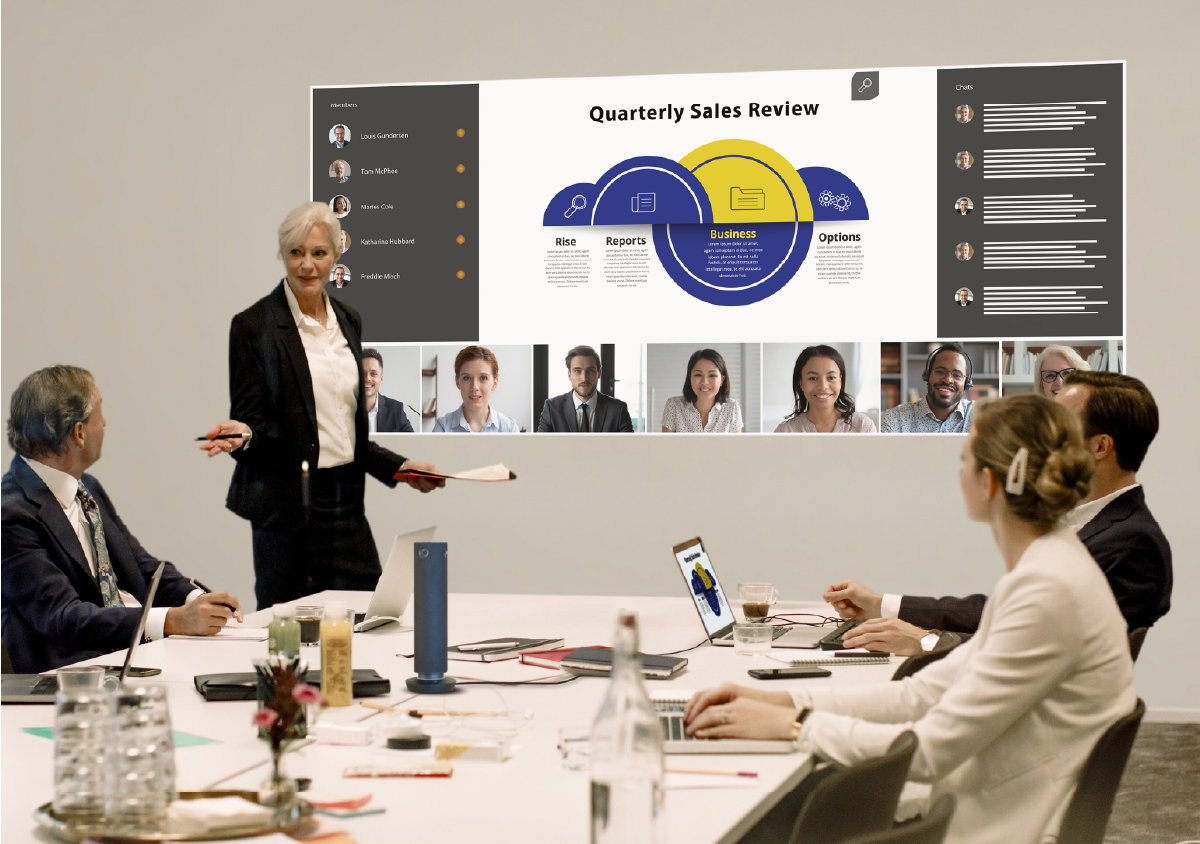
Display widescreen content, such as 21:9 video conferencing layouts, at its original aspect ratio. Remote participants’ faces can be aligned at eye level with in-room attendees, improving communication and engagement during meetings or classes.
Note: Resolution may be reduced when projecting widescreen content at its native aspect ratio.
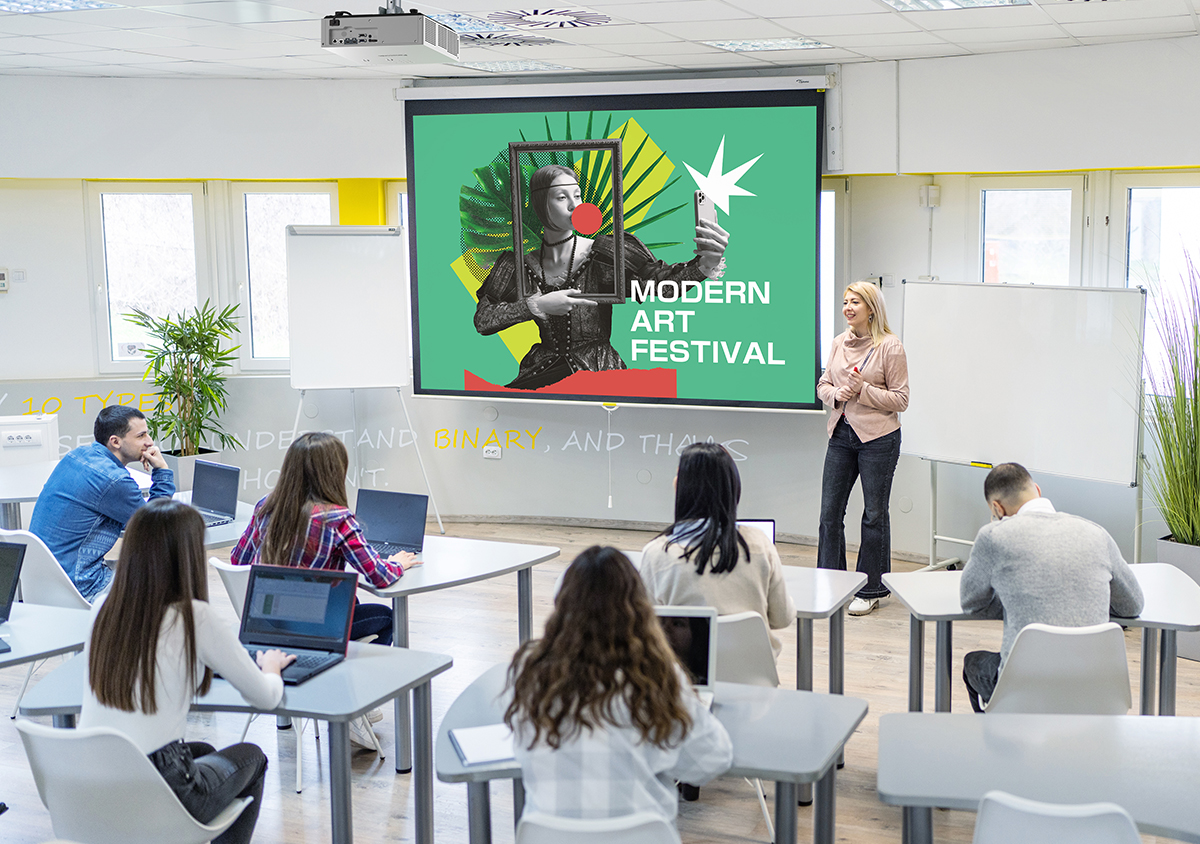
เงียบและเรียบหรู เหมาะกับการเรียนและการประชุม
- เสียงรบกวนต่ำเพียง 25 dB (รุ่น VMZ62)
- มีให้เลือกสีดำและขาว ดีไซน์สวยกลมกลืนกับห้อง
- ขนาดเล็ก น้ำหนักเบา ติดตั้งง่าย
Quiet Operation for Hybrid Lessons and Meetings
The projector’s heat-resistant light source reduces operating noise, enhancing the clarity of conversations during in-person or hybrid lessons and meetings. In Quiet 2 Mode, operating noise is as low as 25 dB1—about as soft as the sound of rustling leaves.
1 For the PT-VMZ62. Please see the product specifications for noise values of other models.
Stylish Design Blends Into Your Room
Available in black or white, VMZ82 Series projectors feature a compact form that harmonizes unobtrusively into any environment. Whether installed in an office, classroom, or museum, the projector minimizes distractions, keeping the focus on your presentation.
การติดตั้งที่ง่ายและยืดหยุ่น
- ซูมออปติคัล 1.6x และเลนส์ชิฟต์ (V: +44%, H: ±20%)
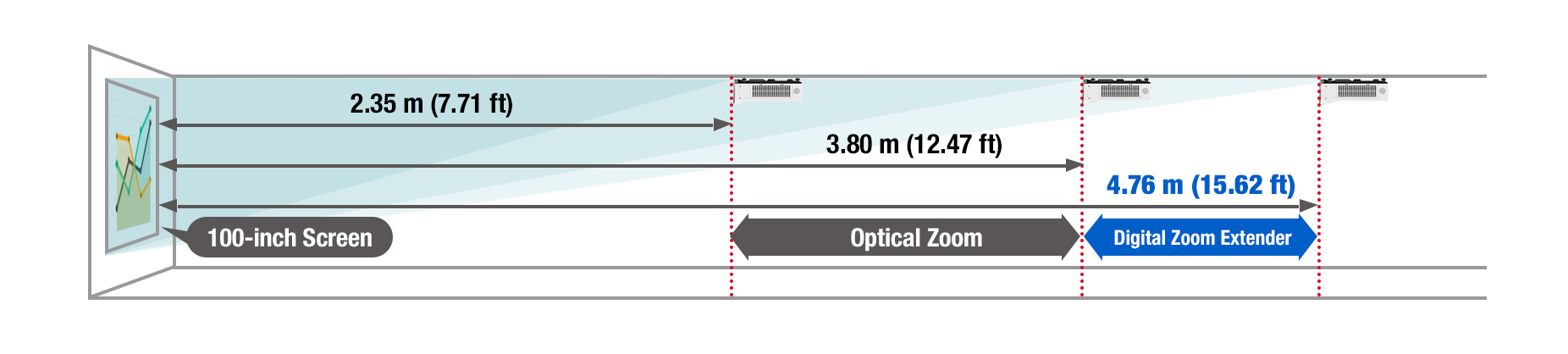
- สามารถฉายภาพ 100 นิ้วจากระยะเพียง 2.35 เมตร และได้ถึง 300 นิ้ว
- ฟังก์ชัน Digital Zoom Extender และ Image Shift
- เซ็นเซอร์มุม (Angle Monitor) ช่วยตรวจสอบการเอียงของเครื่อง
- GUI ใหม่สำหรับการปรับหน้าจอแบบโค้ง
- ฟีเจอร์ Grid, 6-Point Adjustment, และ 4-Corner Correction สำหรับการปรับภาพ
Stress-Free Installation Flexibility
Installation Streamlined with 1.6x Zoom and Lens Shift
Maximize your screen area in rooms of any shape or size. The VMZ82 Series can project a 100-inch image from 2.35 m (7.71 ft) and delivers bright, vibrant visuals on screens up to 300 inches. Its 1.6x optical zoom (throw ratio: 1.09–1.77:1) offers flexibility in mounting, making it easier to work around ceiling obstructions or adjust the image to fit the screen from an existing mount. Combined with lens shift (V: +44%, H: ±20%), it supports off-axis and high mounting positions while maintaining accurate image geometry.
Digital Zoom Extender and Digital Image Shift
Digital Zoom Extender increases the projector’s throw distance beyond its optical zoom range, making it possible to reuse your existing ceiling mount or install the projector farther from the screen, saving construction work. Digital Image Shift allows the image to move up to 10% in any direction for off-axis or high-ceiling installations.
Note: Resolution decreases when using Digital Zoom Extender and Digital Image Shift. When using Digital Zoom Extender, the image reduction rate can be adjusted up to 80%. If set below 100%, the image position can be shifted vertically or horizontally using Digital Image Shift. Some screen correction functions are unavailable when using this function, and the range of corner adjustment is limited. Using the same projector mount may not be possible in every situation.
Quickly Find the Projection Angle with Angle Monitor
Aligning the projection angle with the design simulation can be challenging and usually requires two people. The VMZ82 Series features a built-in gyro sensor that detects changes in the projector’s pitch and roll angles, which are graphically displayed in the OSD menu. Installers can adjust the projection angle without needing assistance.
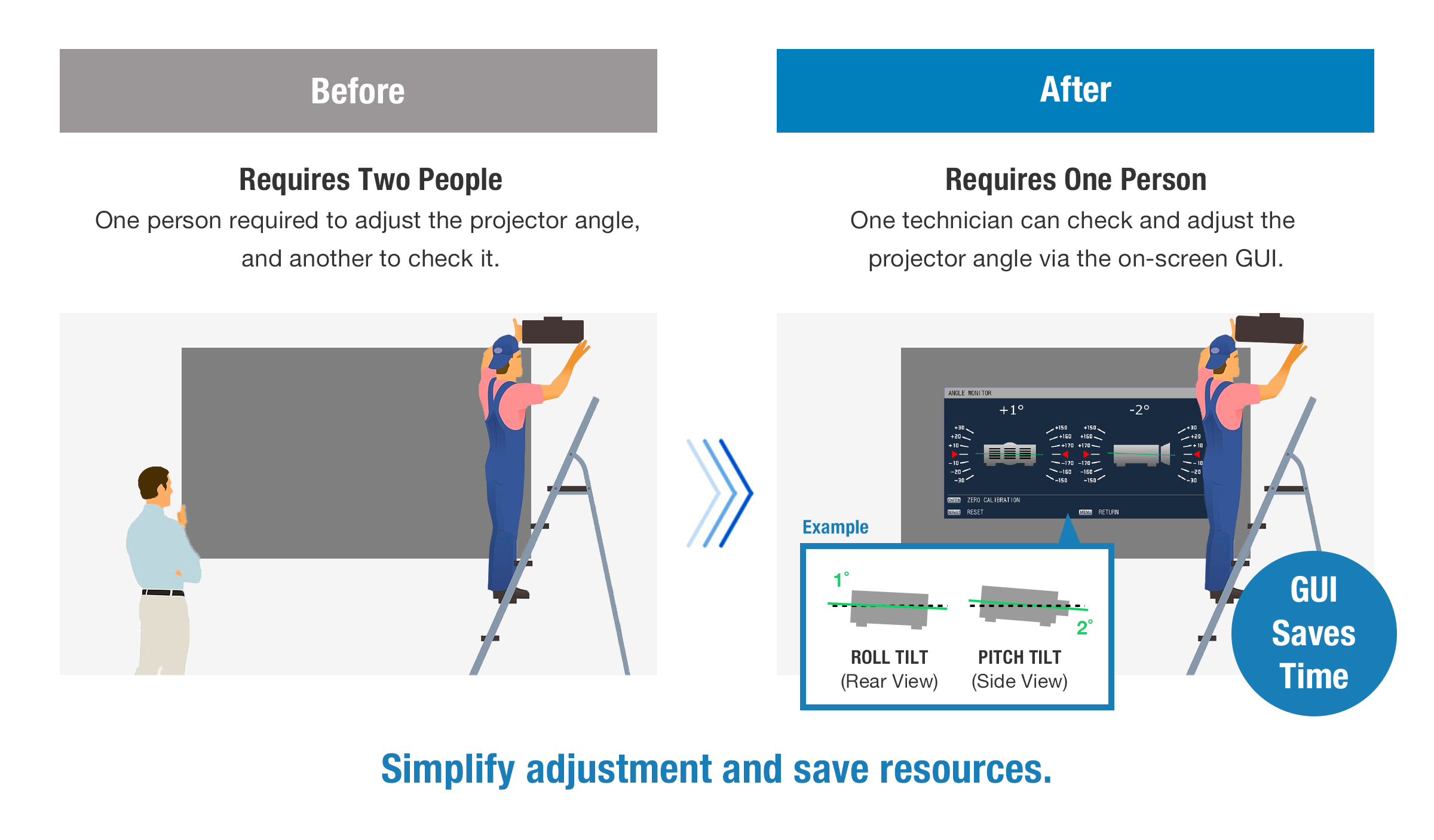
Note: The displayed values are based on the results of angle sensor detection and may differ from the actual projection angle. They are for reference only, and accuracy is not guaranteed.
Upgraded Screen Adjustment with New GUI
The VMZ82 Series introduces an upgraded Screen Adjustment suite with an intuitive new Graphical User Interface (GUI). Designed to simplify setup in various spaces—including curved screens—the GUI streamlines adjustments via remote control without the need for a connected PC, making installation faster, easier, and more flexible than ever.
Precise Line Adjustment via Grid Function
Grid function enables correction of minor distortion by adjusting horizontal or vertical lines on a fixed 11 x 17 grid. Correction is easily performed via remote control.
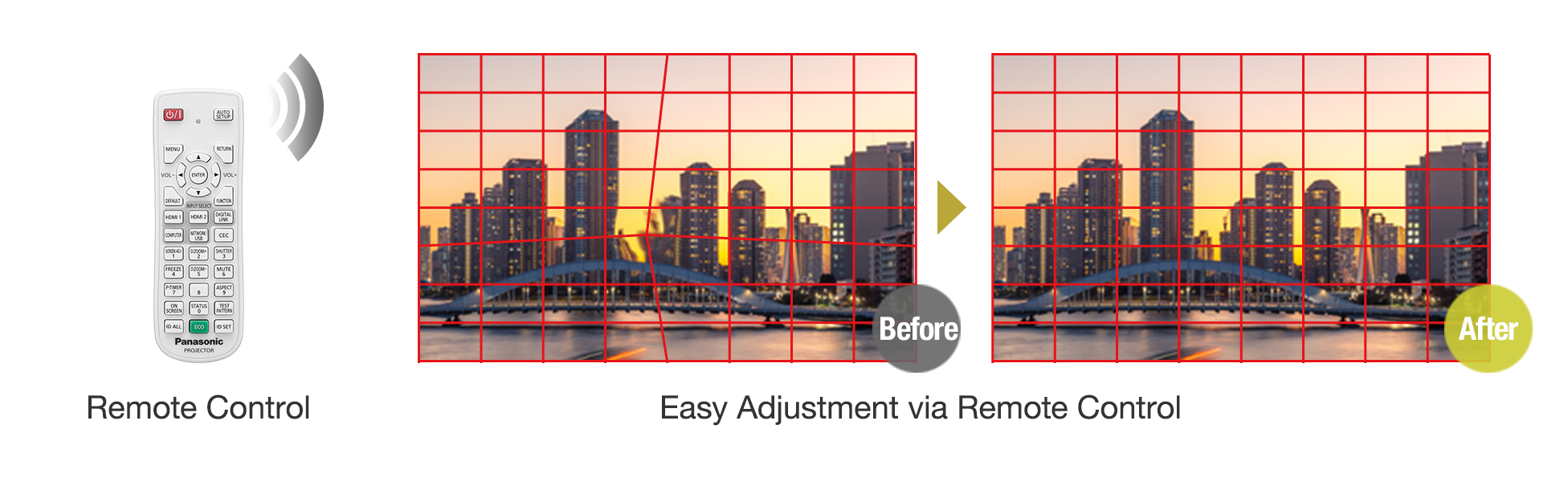
Note: Remote control pictured is for illustrative purposes only.
Enhanced Curved Screen Correction
Curved Correction now allows each side of the image to be adjusted independently—unlike previous models, where opposite sides moved in tandem. This added flexibility supports more accurate correction on curved surfaces, ideal for sports simulators, museum exhibits, and corporate displays.

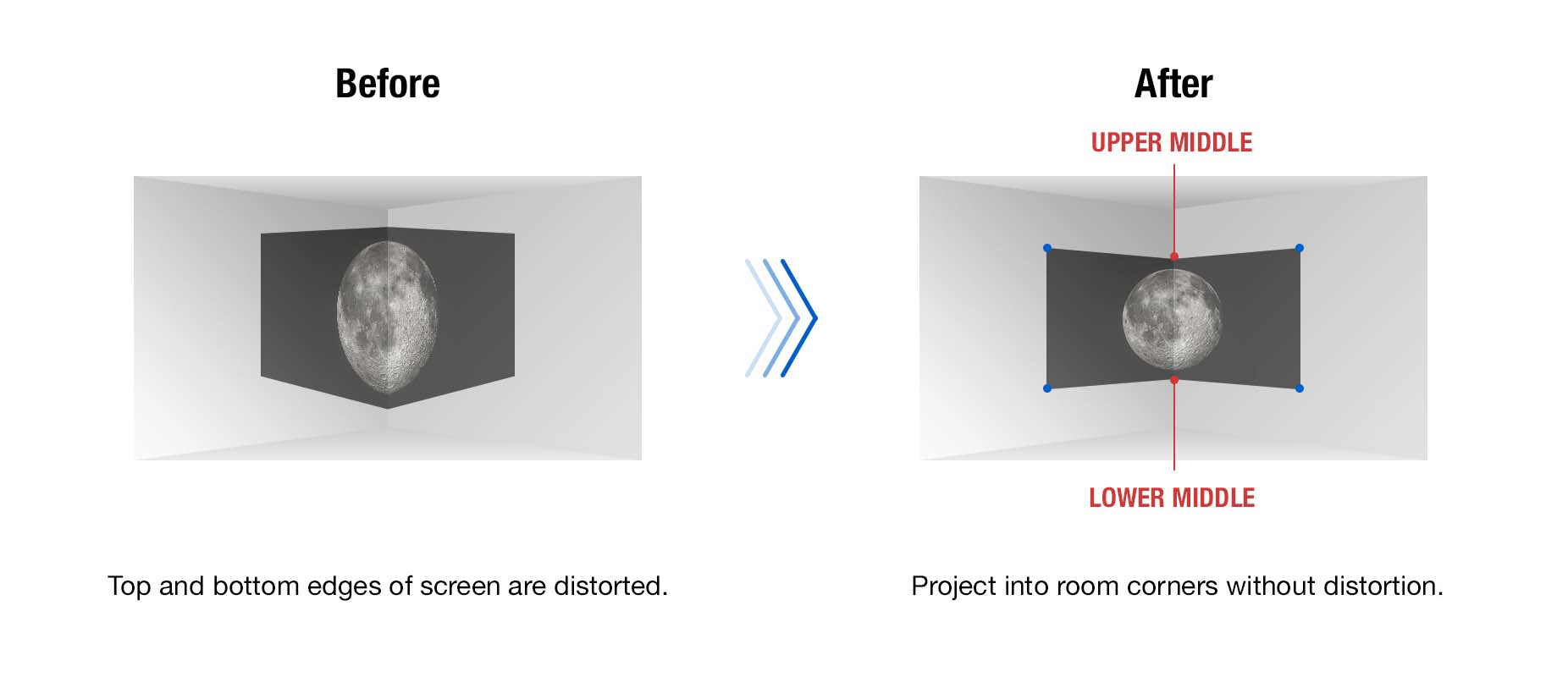
6-Point Screen Adjustment System for Corner Projection
For corner-based or column projections, the 6-Point Screen Adjustment system enables fine-tuned control over image geometry. It’s ideal for maximizing screen use in compact meeting spaces or creating striking visual installations in galleries and showrooms.
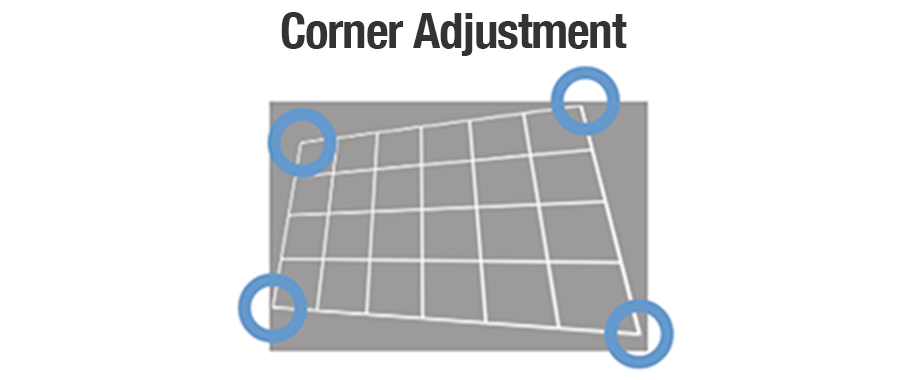
Independent 4-Corner Adjustment
Correct trapezoidal distortion from off-center or angled projector placement. 4-Corner Adjustment lets users independently control each image corner via remote control. Settings can be saved and reapplied, streamlining setup across multiple rooms or sessions.
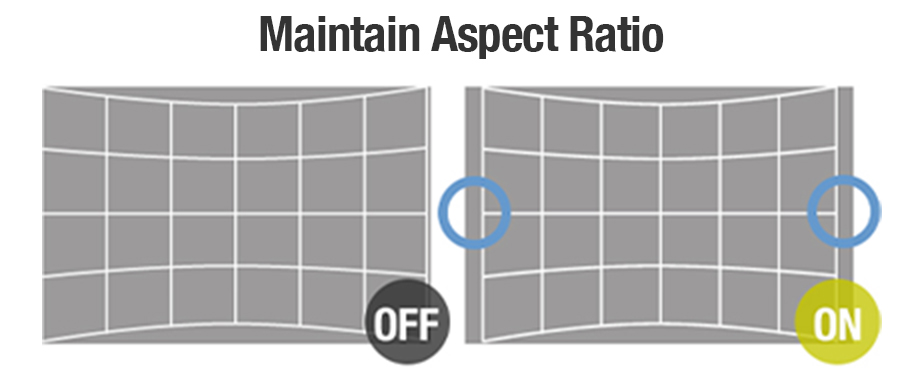
Maintain Aspect Ratio for Natural Scaling
Maintain Aspect Ratio preserves the image’s proportions during adjustment, preventing warping or stretching. It ensures content looks natural while still allowing for edge-to-edge alignment, providing a clean, professional finish in any space.
รองรับ 4K และเชื่อมต่อทันสมัย
- รองรับสัญญาณ 4K ผ่าน HDMI และ DIGITAL LINK
- รองรับโปรโตคอล IPv6, Crestron®, Extron®, PJLink™, Art-Net DMX
- สามารถโคลนการตั้งค่าระหว่างโปรเจคเตอร์ผ่าน LAN หรือ USB
- HDMI รองรับคำสั่ง CEC ใช้งานง่ายขึ้น
รองรับการใช้งานไร้สาย
- แชร์ภาพผ่าน Wi-Fi¹ จากมือถือหรือแล็ปท็อปง่าย ๆ เพียงสแกน QR
- รองรับระบบ PressIT สำหรับนำเสนอแบบไร้สาย
- มี USB สำหรับจ่ายไฟให้ PressIT หรือโมดูลไร้สาย
¹ ต้องใช้โมดูลไร้สาย AJ-WM50 (จำหน่ายแยก)
Single-Cable 4K DIGITAL LINK Solution

4K DIGITAL LINK is a connection based on HDBaseT™ that supports long-distance video, audio, and
control-signal transmission via a single CAT 5e LAN cable, reducing installation complexity in schools, offices, and entertainment spaces.
Note: 4K input signals are converted to the projector’s resolution (1920 x 1200 pixels) upon projection. YPBPR 4:2:0 format only for 4K/30p input via DIGITAL LINK.
Accepts 4K Signals1 via HDMI™ and DIGITAL LINK
The VMZ82 Series accepts 4K1 video signals via DIGITAL LINK and HDMI™ terminals, simplifying projector integration into your existing infrastructure. This capability enables 4K1 signal transmission to display endpoints with varying screen resolutions, eliminating the need for external converters or content re-encoding.
1 4K input signals are converted to the projector’s resolution (1920 x 1200 pixels) upon projection. YPBPR 4:2:0 format only for 4K/30p signals input via DIGITAL LINK.
Supports Next-Generation Control Protocols
Dedicated LAN terminal and DIGITAL LINK connections support the latest protocols, including IPv6, Art-Net DMX, PJLink™ (Class 2), Crestron Connected® V2, Crestron® XiO Cloud, and Extron XTP®. The projector also includes an emulation function to ensure compatibility with legacy management software.
Note: The optional AJ-WM50 Series Wireless Module does not support IPv6.
Data Cloning Function via LAN or USB Memory Devices
It can be time-consuming to adjust the same settings on each projector in your fleet. To expedite this task, the VMZ82 Series features a data cloning function that allows main projector settings, including saved adjustment data, to be copied to sub-projectors via LAN or USB device.
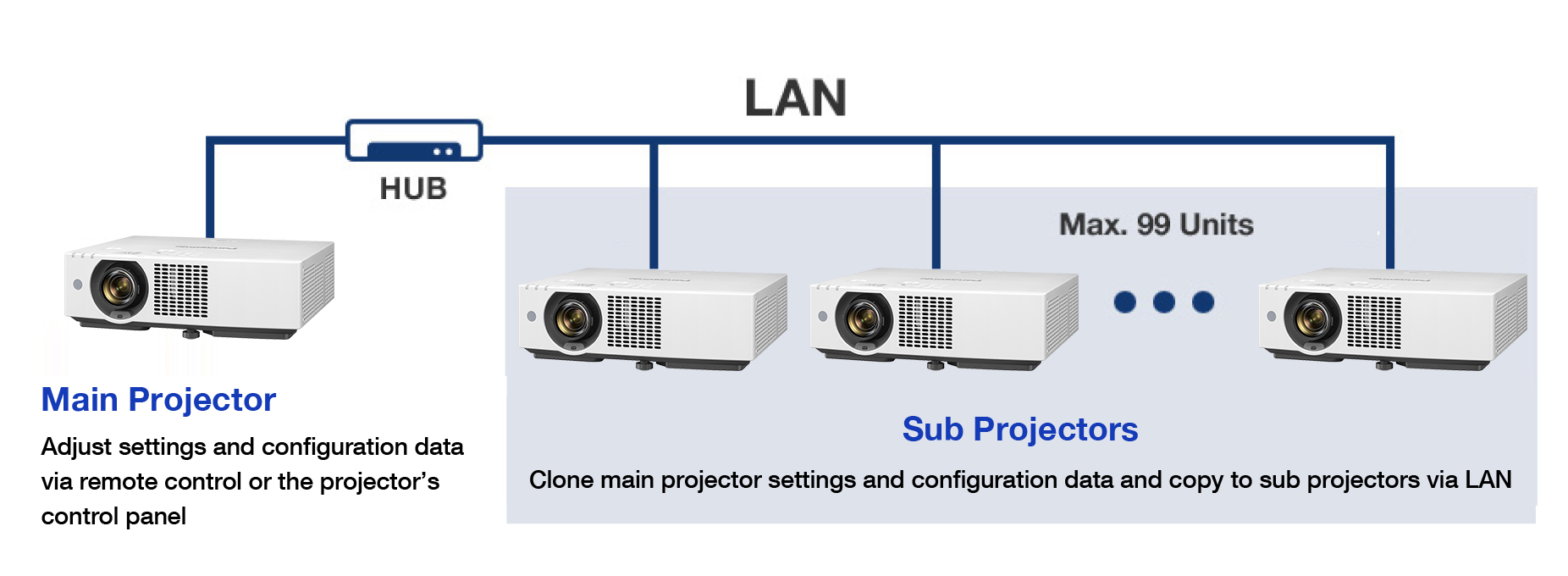
Note: Supported on identical models only. Excludes passwords, projector name/ID, time, date, time zone, and network settings. Data can be copied to a maximum of 99 sub-projectors via LAN.
CEC Command-Compatible1 HDMI™ Makes Life Easy
Both the projector’s HDMI™ inputs are compatible with CEC commands1, enabling use with fewer remote controllers. The projector will automatically switch on, play your content, and switch off when it detects these commands from a compatible source device.
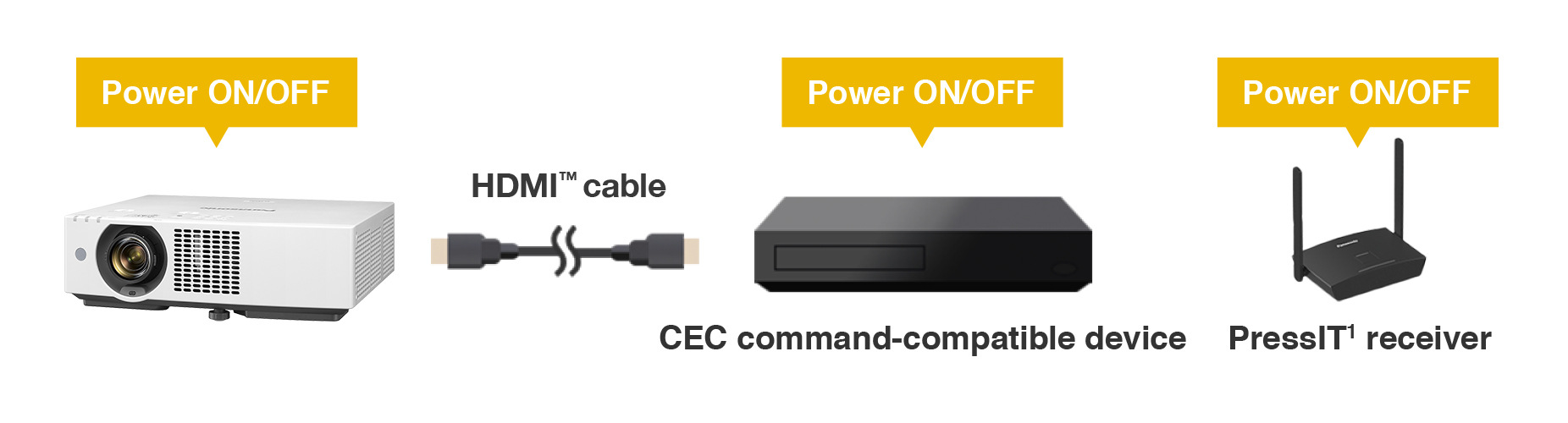
1 Depending on the connected CEC command-compatible device, the link control may not operate normally.
Project Wirelessly1 from Your Smartphone or Laptop
Share content wirelessly1 from your laptop or smartphone. Just scan the QR code shown in the on-screen display menu using your smartphone’s camera, and your device will connect to the projector automatically over wireless LAN, with no SSID or passwords required. Use free Panasonic wireless apps2 to beam your media to the big screen.
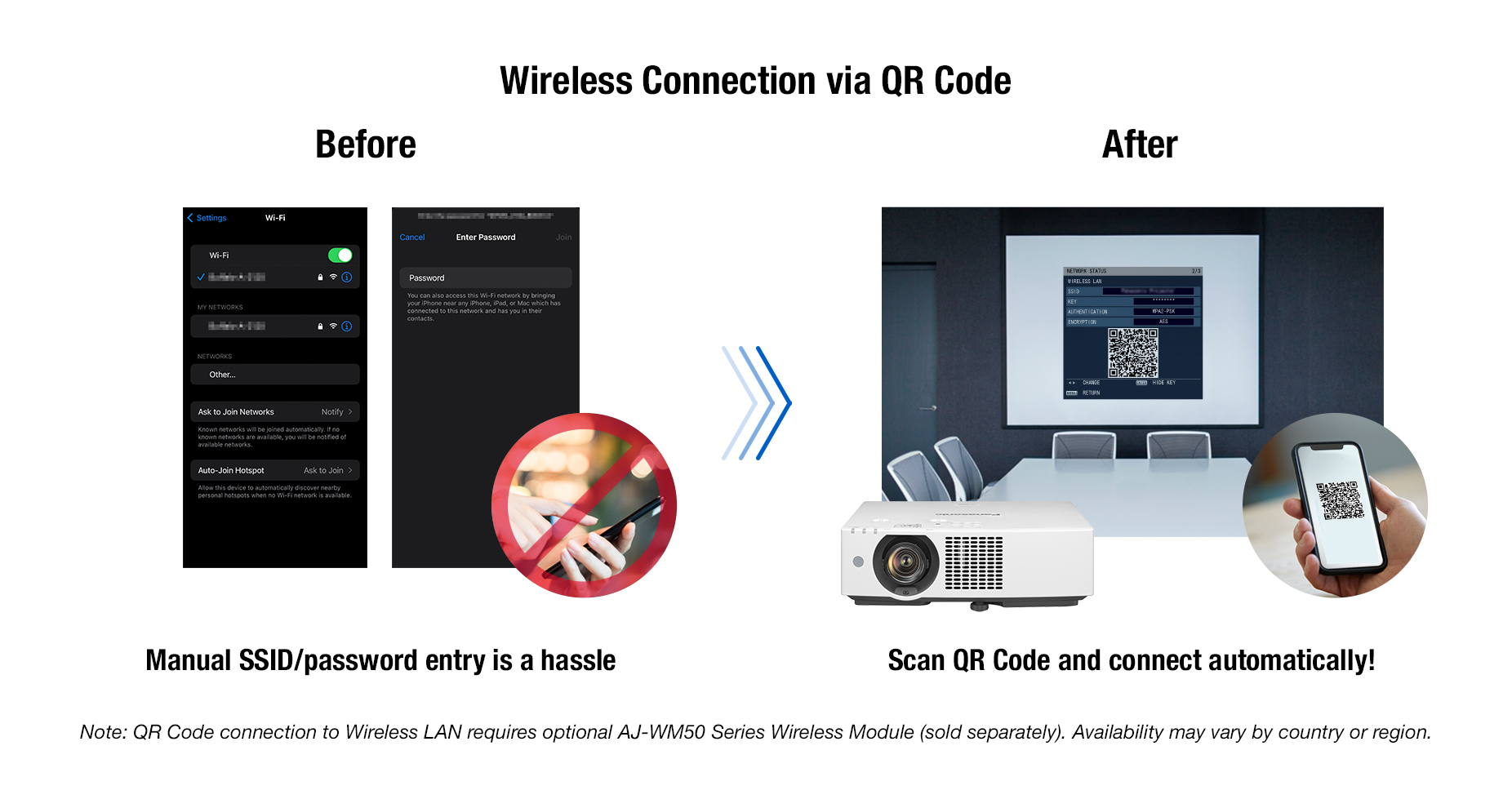
1 Requires the optional AJ-WM50 Series Wireless Module (sold separately). Product availability may vary by country or region.
2 Free software is available for Windows® PC here. Wireless Projector app is available from the App Store or the Google Play store. Please check the compatibility of your device before installation.
Share Seamlessly with PressIT
Share your device screen wirelessly and switch presenters freely. PressIT, Panasonic’s optional Wireless Presentation System, supports screen-sharing at the press of a button. PressIT comprises transmitters connected to your devices1 and a receiver connected to the projector. For neat installation, power is supplied via the projector’s DC 5 V/2 A USB port. Learn more about PressIT here or visit our Wireless Solutions webpage.
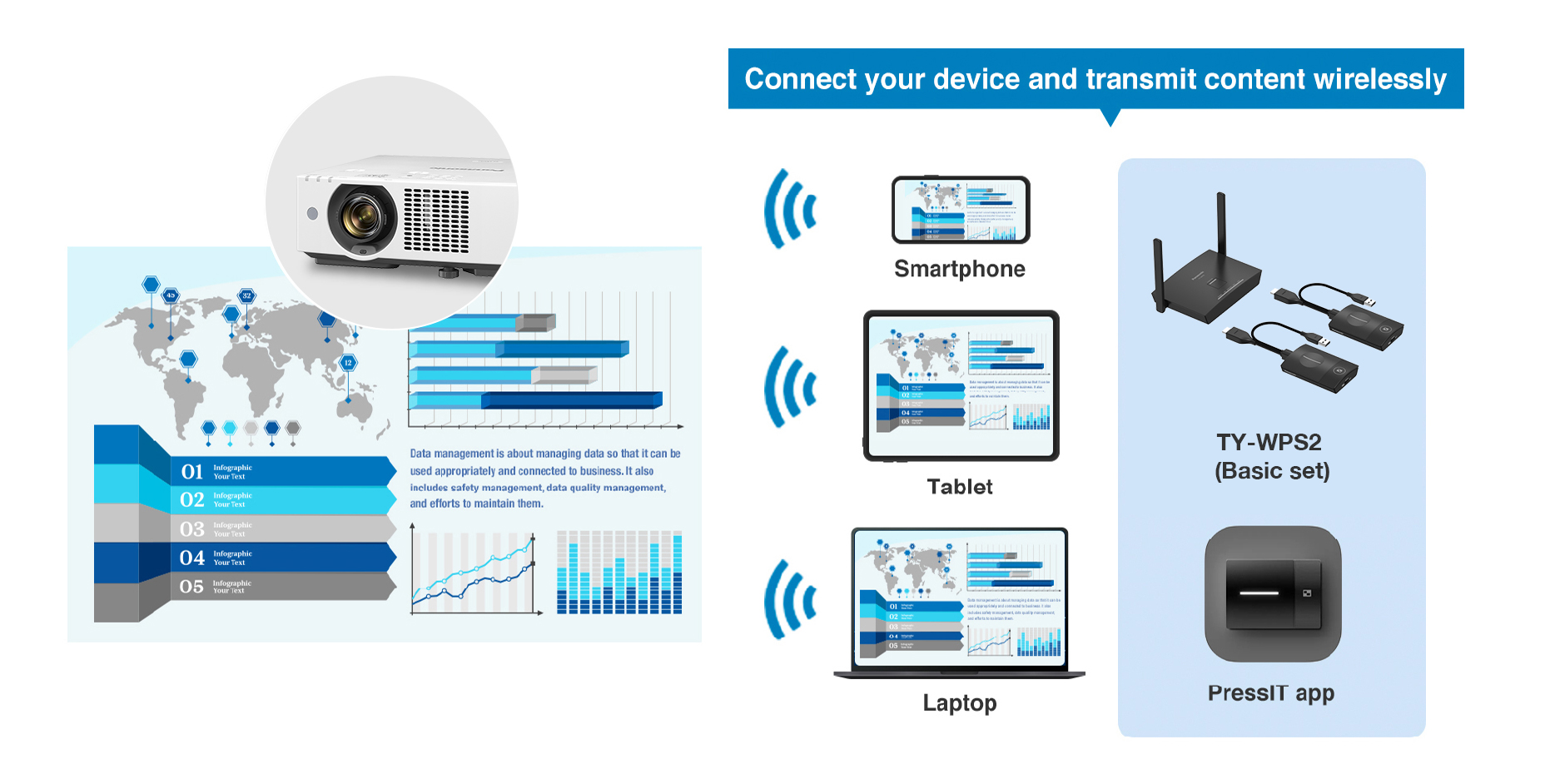
Note: Wireless Presentation System PressIT is sold separately. Availability may vary by country or region.
1 USB Type-C terminal of the video output device requires support for DisplayPort™ ALT Mode (video output function) and power supply function (5 V/0.9 A). PressIT app (available free from the App Store or the Google Play store) is required when using Android™ or iOS/iPadOS devices. For more details, please refer to the operating manual.
ออกแบบเพื่อความยั่งยืนและประหยัด
- ประหยัดพลังงานมากขึ้น 27% (21.2 ลูเมน/วัตต์)
- ใช้พลาสติกรีไซเคิลประมาณ 59% ของตัวเครื่อง
- ไม่มีการเปลี่ยนหลอดไฟนานถึง 20,000 ชั่วโมง
- ฟิลเตอร์แบบ ECO Filter ทำความสะอาดง่าย ใช้ได้นาน
- โหมด Auto Power On และ Image Detection ลดการใช้พลังงาน
- Quick Startup แสดงภาพใน 1 วินาที
Efficient and Eco-Conscious Design
Our Most Efficient Portable Projector
The PT-VMZ82 Series is 27%1 more energy efficient than the current VMZ71 Series, generating an impressive 21.2 lumens of light per watt of energy consumed in NORMAL mode. Enjoy significant energy savings and reduce the carbon footprint of every unit in your fleet.
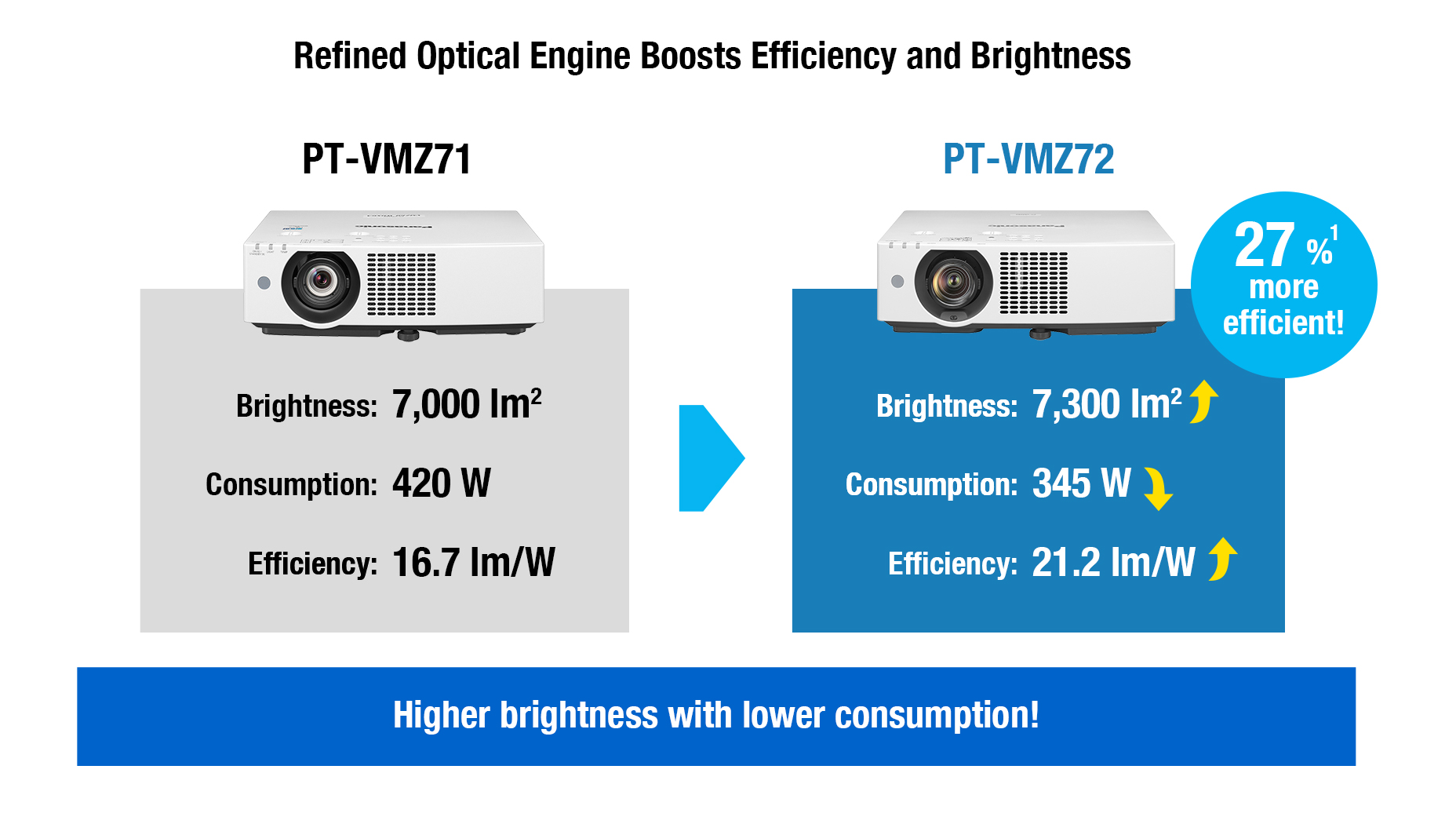
1 PT-VMZ72 (21.2 lm/W) compared to the PT-VMZ71 (16.7 lm/W) in [NORMAL] mode, according to Panasonic research.
2 Measured when [PICTURE MODE] is set to [DYNAMIC] and [LIGHT POWER] is set to [NORMAL]. Measurement, measuring conditions, and notation method comply with ISO/IEC 21118: 2020 international standards. Value is the average of all products when shipped.
Features Eco-Friendly Recycled Materials

The VMZ82 Series is designed with sustainability in mind. The plastic used in the projector’s main body contains approximately 59%1 recycled resin to reduce reliance on virgin plastics. Recyclable cardboard insulation replaces foam in the shipping carton, and unnecessary packaging has been eliminated to cut waste. These efforts support eco-conscious manufacturing and help your organization reduce its footprint throughout the projector’s lifecycle.
1 By total weight of plastic parts in the projector main unit. Excludes projection lenses, printed circuit boards, labels, cables, connectors, electronic components, optical components, ESD components, EMI component adhesives, and coatings.
No Light-Source Maintenance for 20,000 Hours1
The VMZ82 Series offers more than consistent, long-lasting picture quality. Its laser light source operates for about 20,000 hours1 without maintenance, outperforming lamp projectors that may require several lamp replacements over the same period. This reduces operating costs and eliminates mercury lamp disposal.
1 Around this time, the light output will have decreased to approximately 50 % of its original level ([PICTURE MODE]: [DYNAMIC], [DYNAMIC CONTRAST] set to [2], temperature
30 °C [86 °F], elevation 700 m [2,297 ft] with 0.15 mg/m3 of particulate matter). The estimated time until light output declines to 50 % varies depending on the environment.
Filter cleaning cycle: 20,000 hours (under dust conditions of 0.08 mg/m3), 10,000 hours (under dust conditions of 0.15 mg/m3). The filter cleaning cycle varies depending on the environment.
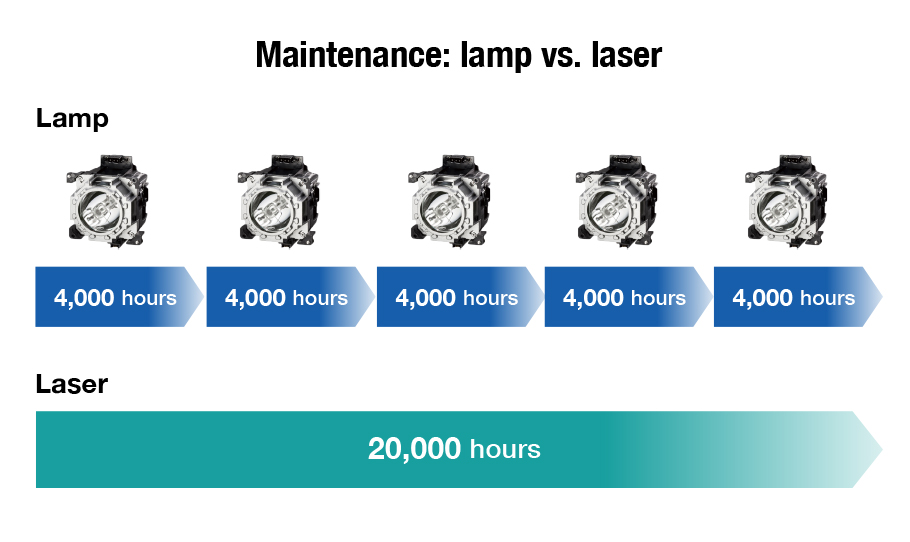
Note: Lamp replacement cycle is approximate and varies by model and other factors.
Long-Life ECO Filter Reduces Downtime
ECO Filter includes a Micro-Cut Filter that collects minute dust particles with an electrostatic effect. With the dust-resistant projector cabinet design, ECO Filter enables low maintenance and long-term use with less downtime. Filter replacement is recommended at about 20,000 hours1 when used in typical commercial environments. If it’s necessary to maintain the filter before then, it can be washed and reused2, reducing cost and waste.
1 Filter cleaning cycle: 20,000 hours (under dust conditions of 0.08 mg/m3), 10,000 hours (under dust conditions of 0.15 mg/m3).
2 Filter can be washed and reused up to two times. When washing the filter with water, please follow the procedures listed in the operating instructions.
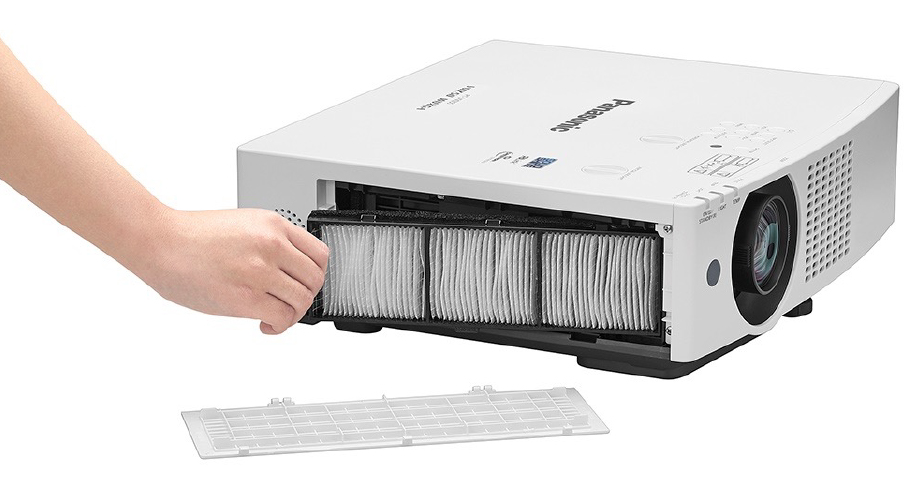
Note: PT-VMZ60 pictured for illustrative purposes.
Auto Power On: Save Power, Streamline Operation
The VMZ82 Series features an Auto Power On function that automatically turns the projector on from standby and begins projection when an input signal is detected. This allows presenters to turn off the projector between sessions without worrying about delays, streamlining daily use and reducing unnecessary energy consumption.
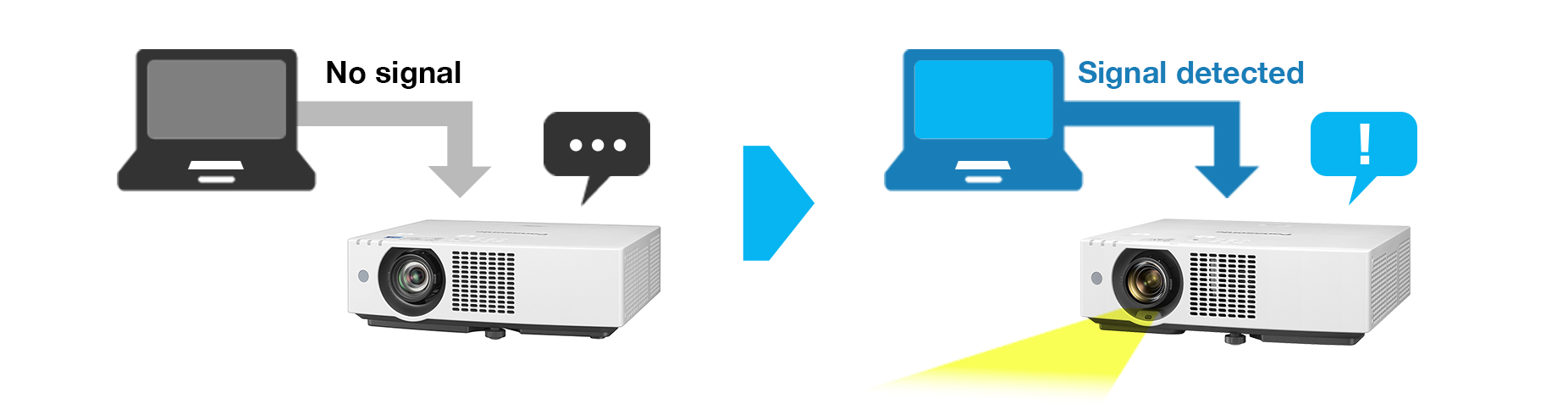
Note: Settings cannot be made when [STANDBY MODE] is set to [ECO] or when [IN STANDBY MODE] is set to [ON] in the [AUDIO SETTINGS] menu. Auto Power On is supported when the input signal is transmitted via HDMI™ or COMPUTER IN terminals.
ฟังก์ชันการจัดการแบบมืออาชีพ
- ฟังก์ชันกำหนดตารางเวลาเปิด-ปิด และเปลี่ยนอินพุต
- รองรับการจัดการผ่าน Multi Monitoring & Control Software
- ฟีเจอร์ด้านความปลอดภัย เช่น ชัตเตอร์อัตโนมัติและการล็อก
Image Detection: Smart Power Savings
A new Image Detection function helps reduce power consumption during inactivity. If no change is detected in the projected image for a set time, the projector can automatically dim the light output by 50% or turn off the light source. The timer is adjustable, and brightness returns seamlessly when activity resumes1, reducing energy waste without interrupting the experience.
1 If the projector enters standby while in Image Detection power-saving mode, resumption time may vary depending on standby settings and input source.
Note: Settings cannot be made when [DYNAMIC CONTRAST] is set to anything other than [OFF], [ECO MANAGEMENT] → [AUTO POWER SAVE] is set to [OFF], [ECO MANAGEMENT] → [LIGHT POWER] is set to anything other than [NORMAL], a [TEST PATTERN] is displayed, or there is no signal. Image Detection function is supported when the input signal is transmitted via HDMI™ or COMPUTER IN terminals.
Start Work Faster with Quick On
The VMZ82 Series includes a Quick Startup mode. When enabled, the projector displays your content at full brightness in about one second1 when started from standby—no fade-in delay as with lamp-based models. This helps you resume presentations quickly, minimizing distractions. Additionally, Direct Power Off2 lets you shut down the projector using the room breaker or by unplugging the power cord—no cooldown required.
1 When [ECO MANAGEMENT] > [QUICK STARTUP] is set to [ON]. [QUICK STARTUP] is unavailable after the [AVAILABLE PERIOD] setting has expired. When [QUICK STARTUP] is set to [ON], the projector continues to warm up, increasing power consumption. When [QUICK STARTUP] is set to [ON], the standby period when the [QUICK STARTUP] function is valid will be added as the projector runtime. [QUICK STARTUP] cannot be set when [STANDBY MODE] is set to [ECO]. Time varies depending on connection terminals, signals, and other conditions.
2 Settings made just before power is disconnected may not be retained on the next startup.
Effortless Automation with Built-In Scheduling
The VMZ82 Series introduces a new scheduling feature accessed via the OSD settings menu. You can program the projector to perform automated actions, including power on/off, shutter activation, and input selection, at specific times throughout the week. This functionality streamlines operations, reduces manual labor, and optimizes resource management.
Works with Multi Monitoring & Control Software
The VMZ82 Series is compatible with Multi Monitoring & Control Software, which enables management of up to 2,048 display devices from a remote PC over LAN. The software facilitates status monitoring, device control, playlist delivery, playback scheduling, and system map visualization. For more information, please visit our software information webpage.
Other Features
- ・ Shutter function and Auto Image Rotation function
- ・ Audible remote control feedback for projector on/off
- ・ Security slot and customizable startup logo
- ・ USB port for DC 5 V/2 A power supply, data transfer,
firmware updates, and optional wireless module - ・ Lens Block detection reduces light output when lens is
obstructed to prevent damage
- ・ Compatible with the Multiple PJ Firmware Batch Update Tool
- ・ Presentation Support System
- ・ Multi-Screen Support System
- ・ Multi-Unit Brightness and Color Control
- ・ DICOM Simulation Mode
- ・ ECO Management System
สรุปข้อมูลจำเพาะทางเทคนิค (Specifications)
 PT-VMZ82 |
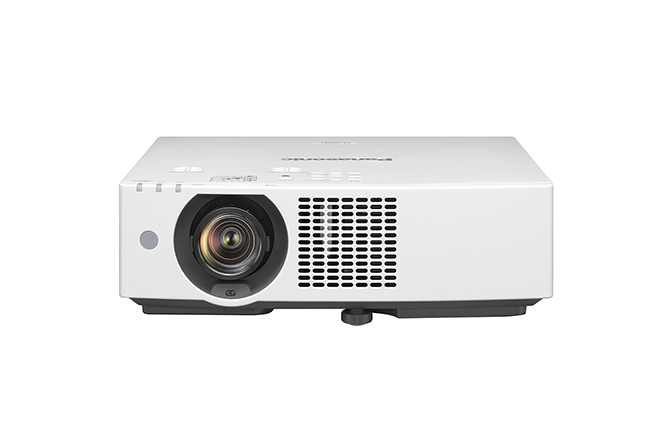 PT-VMZ72 |
|
|---|---|---|
| Projector type | LCD projectors | |
| LCD panel | ||
| Panel size | 16.3 mm (0.64 inch) (16:10 aspect ratio) | |
| Display method | Transparent LCD panel (x 3, R/G/B) | |
| Pixels | 2,304,000 (1920 x 1200) pixels x 3 | |
| Light source | Laser diodes | |
| Light output1
?
|
8,000 lm2 / 8,000 lm (ANSI)3 | 7,300 lm2 / 7,300 lm (ANSI)3 |
| Time until light output declines to 50 %4 |
20,000 hours (NORMAL/QUIET), 24,000 hours (ECO) | |
| Resolution | WUXGA (1920 x 1200 pixels) | |
| Contrast ratio2 | 5,000,000:1 (Full On/Full Off) (When [PICTURE MODE] is set to [DYNAMIC] and [DYNAMIC CONTRAST] is set to [1].) |
|
| Screen size (diagonal) |
0.76–7.62 m (30–300 in), 16:10 aspect ratio | |
| Center-to-corner zone ratio2 |
85 % | |
| Lens | 1.6x manual zoom (throw ratio: 1.09–1.77:1), manual focus lens, F=1.58–1.91, f=15.30‒24.60 mm | |
| Digital Zoom Extender5 |
Throw Ratio 1.09–2.21:16 (Corresponding value. When used together with optical zoom.) | |
| Lens shift (From the origin point of the lens mounter) |
||
| Vertical | +44 % | |
| Horizontal | ±20 % | |
| Keystone correction range |
Vertical ±25 %, Horizontal ±35 % | |
| Terminals | ||
| HDMI™ 1/2 IN | HDMI™ 19-pin x 2 (Compatible with HDCP, Deep Color, 4K/30p7 signal input), CEC supported8 | |
| COMPUTER IN | D-sub 15-pin (female) (RGB/YPBPR/YCBCR) | |
| AUDIO IN | M3 stereo mini-jack x 1 | |
| AUDIO OUT | M3 stereo mini-jack x 1 | |
| SERIAL IN | D-sub 9-pin (female) x 1 for computer control (RS-232C compliant) | |
| DIGITAL LINK/LAN | RJ-45 x 1 for network and DIGITAL LINK connection (video/network/serial control) (HDBaseT™ compliant), 100Base-TX (Compatible with PJLink™ [Class 2], HDCP, Deep Color, 4K/30p7 signal input) |
|
| LAN | RJ-45 x 1 for network control, 10Base-T, 100Base-TX, compatible with PJLink™ [Class 2] | |
| USB (VIEWER/ WIRELESS/DC OUT) |
USB connector (Type A) x 1 for Memory Viewer function, optional AJ-WM50 Series Wireless Module, power supply (DC 5 V, maximum 2 A9) |
|
| Protocol versions | IPv4, IPv610 | |
| Power supply | AC 100 –240 V, 50/60 Hz | |
| Maximum power consumption11 | 400 W (4.2 A ) (405 VA) (Power consumption is 385 W at 200–240 V) |
345 W (3.6 A) (350 VA) (Power consumption is 335 W at 200–240 V) |
| On-mode power consumption (Operating mode)11 |
|
|
| Built-in speaker | 10 W monaural | |
| Cabinet materials | Molded plastic | |
| Filter12 | Included (Estimated maintenance time: approx. 20,000 hours) | |
| Operation noise2 | 39 dB (NORMAL/ECO), 34 dB (QUIET 1), 29 dB (QUIET 2) |
37 dB (NORMAL/ECO), 32 dB (QUIET 1), 27 dB (QUIET 2) |
| Dimensions (W x H x D) |
399 mm x 115 mm x 348 mm (15 23/32˝ x 4 17/32˝ x 13 11/16˝ ) (not including protruding parts) 399 mm x 133 mm x 348 mm (15 23/32˝ x 5 1/4˝ x 13 11/16˝ ) (with feet at shortest position) |
|
| Weight13 | Approx. 7.4 kg (16.3 lbs) | Approx. 7.0 kg (15.4 lbs) |
| Operating environment | Operating temperature: 0–45 °C (32–113 °F)14, 15, Operating humidity: 20–80 % (no condensation) | |
| Applicable software | Multi Monitoring & Control Software, Projector Network Setup Software, Presenter Light Software for Windows®16, Wireless Projector App for iOS/Android™17 |
|
มาเป็นคนแรกที่วิจารณ์ “Panasonic PT-VMZ72 WUXGA 3LCD Laser Projector (7,300 lumens)”
สินค้าที่เกี่ยวข้อง
โปรเจคเตอร์
รีวิว
ยังไม่มีบทวิจารณ์